Veriscan Integration

Below are helpful links on how to get your Veriscan integration set up. You will need to work with Veriscan and POSaBIT to get this set up.
Note: The POSaBIT Veriscan integration only supports Veriscan scanners connected to a Windows PC, which is typically the setup used at check-in stations. Android devices are not ye supported. This includes Veriscan's Android scanners and any direct scanning integration with the POSaBIT POS. Please reach out if to inquire about Android support.
How to Create the POSaBIT Webhook to Paste into Veriscan:
- Log into your venue level POSaBIT Portal
- Go to the Settings tab --> Integrations
- On the Integrations page, click the blue New Integration button in the top right
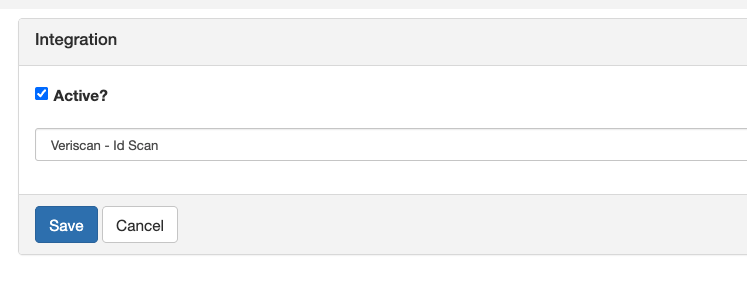
- Select Veriscan - ID Scan under the dropdown and Save.
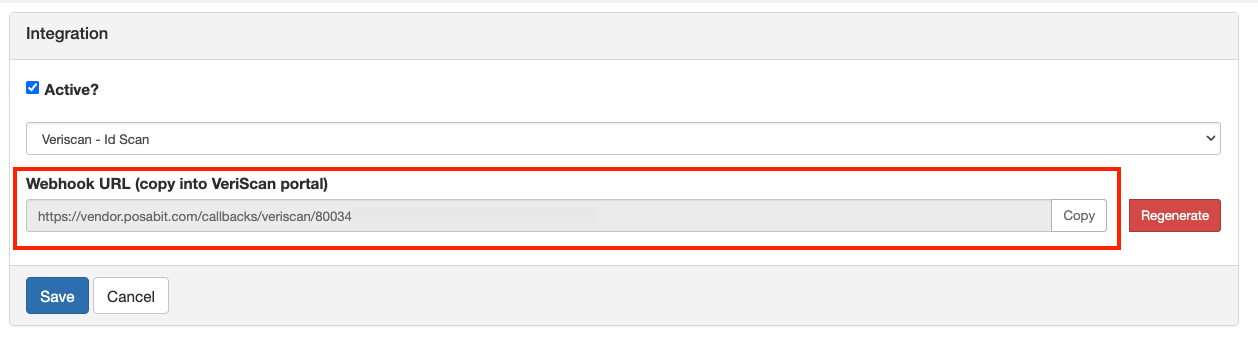
- You will now be brought to the Integration Connections page. Click Edit on the Veriscan integration.
- Copy the link in the Webhook URL field and use this link to paste into Veriscan