Sales by Employee Report

The Sales by Employee report tracks different employee metrics to help you better understand how your employees are performing.
The table displayed in this report provides a breakdown of each employee, including their total sales, MJ and non-MJ sales, transaction count, items sold, average order, cash and debit totals, gratuity, and more! Below the table, the Total Sales by Employee chart shows each employee's MJ and non-MJ sales, highest first. There is also an option to customize this report, allowing you to get the exact information you are looking for! This report can be useful in a couple of different scenarios. First, keeping an eye on the performance of your employees is always a good idea. Secondly, when tracking tips, this report can display exactly how much each employee made within the selected time frame.
Filter Breakdown:
- Date Range
- Columns: Select the columns you want to show or hide. Click Reset to bring back the default columns.
- Search
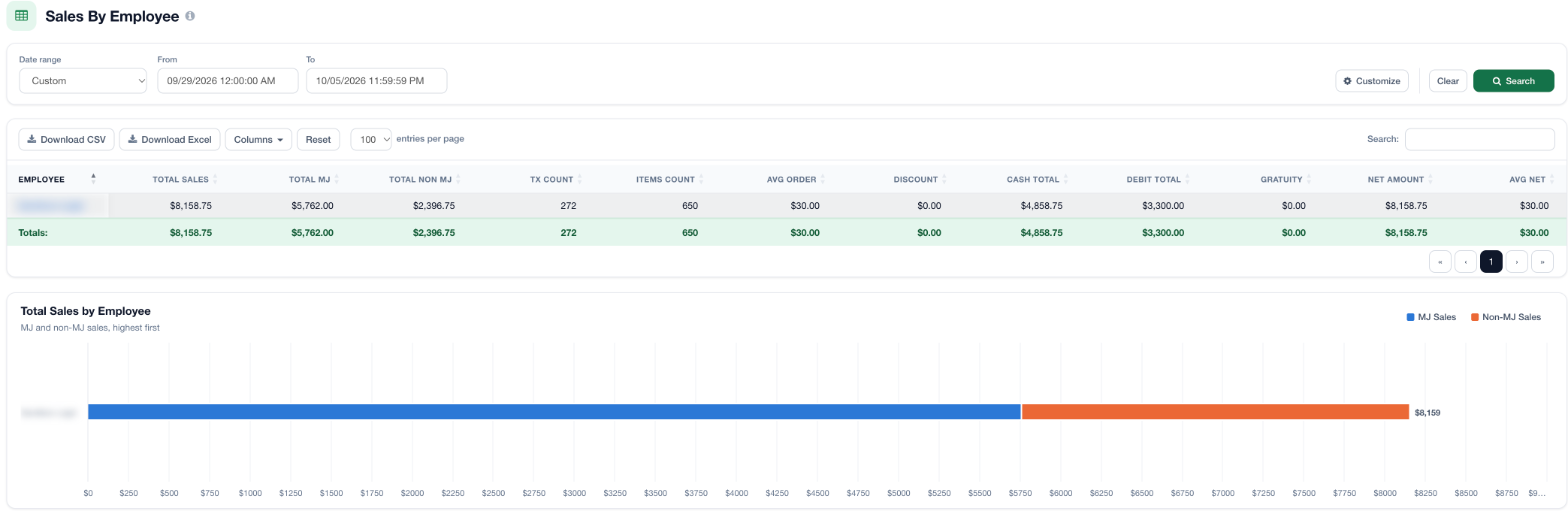
To download a full report with more information, click the Download CSV or Download Excel button at the top of the table

Customize this report:
If you want to build a more customized sales by employee report, select the Customize button on the top right of the page. To learn all about custom sales reports, see this article here!
For additional assistance, please reach out to POSaBIT support @ 1 (855) POSaBIT OR SUPPORT@POSaBIT.COM